Godot的GDExtension通过运行时动态加载编译完成的Dll文件
实现对编辑器功能的扩展,并且无需重新编译引擎源代码
虽然Godot官方确实有这样的教程,但在我实际按照教程操作时,发现很多已过时的内容
本文章采用的版本是4.5
从导出符号文件里面的注释,GDExtension的API应该是时常修改的,所以与教程有差别也正常
并且Godot官方的教程存在部分未翻译的情况,所以觉得还是要写点东西记一下
本文章不大会对函数的具体功能做介绍,只是让GDExtension可以跑起来
代码仓库
<0x00> 从Godot中导出GDExtension符号
首先要获取GDExtension需要的符号文件
这一步需要确保你的Godot执行文件可以在命令行中找到
(这里推荐通过scoop安装Godot,会自动配置这一块的)
命令行中执行下列语句
godot --dump-gdextension-interface
godot --dump-extension-api
这样会得到两个文件,分别是gdextension_interface.h与extension_api.jsongdextension_interface.h包括了编译时需要的符号信息,里面都是C风格的定义extension_api.json包含了Godot类型的信息,包括类型大小等,编译时不需要,只是供代码编写时使用
<0x01> 配置目录结构与构建系统
我们主要分两个文件夹来组织文件
gdextension_c_example
├── demo    # 编译输出文件夹
└── src     # 源代码文件夹
需要把gdextension_interface.h放到src文件夹中
官方的教程使用Scons作为构建系统,但这个我不熟,所以我换成了我更熟悉的Xmake
因为最后只要能输出相应的动态链接库即可,所以其实构建系统是可以挑自己喜欢的
这里使用到的Xmake.lua如下
add_rules("mode.debug", "mode.release")

target("ExtensionTest")
    set_kind("shared")
    set_toolchains("clang")
    set_targetdir("demo/bin")
    add_files("src/*.c")
这里还指定了使用clang工具链,只是因为我比较喜欢clang,用其他的也问题不大
<0x02> 编写代码
对于GDExtension,Godot通过一个函数入口来初始化调用
函数入口的名字无所谓,只要可以和之后的配置文件对上即可
这里假设入口函数名为gdexample_library_init,入口函数签名是这样的
GDExtensionBool gdexample_library_init(GDExtensionInterfaceGetProcAddress p_get_proc_address,
                                    GDExtensionClassLibraryPtr p_library,
                                    GDExtensionInitialization *r_initialization)
// GDExtensionBool: uint_8
// GDExtensionInterfaceGetProcAddress: void(*(*)(const char*))()
// GDExtensionClassLibraryPtr: void*
// GDExtensionInitialization: (struct)
某种程度上,只写这样一个函数就可以
但这样会导致代码很难维护,所以需要将一些东西分离出来,方便开发
扩展配置文件
首先先在demo文件夹下面创建插件的配置文件gdexample.gdextension
# ./demo/gdexample.gdextension
[configuration]

entry_symbol = "gdexample_library_init"
compatibility_minimum = "4.2"

[libraries]
macos.debug = "res://addon/bin/ExtensionTest.dylib"
linux.debug = "res://addon/bin/ExtensionTest.so"
windows.debug = "res://addon/bin/ExtensionTest.dll"
entry_symbol表示函数入口符号,能对应上即可
下面的[libraries]指示Godot该在哪里找到动态链接库
扩展的其他符号定义
gdextension_interface.h只导出了必须的GDExtensionAPI
而Godot的很多其他部分如StringName的符号定义并未给出
所以需要有一个定义其他符号的文件
创建./src/defs.h文件,内容如下
#pragma once

#include <stdbool.h>
#include <stddef.h>
#include <stdint.h>

#if !defined(GDE_EXPORT)
#if defined(_WIN32)
#define GDE_EXPORT __declspec(dllexport)
#elif defined(__GNUC__)
#define GDE_EXPORT __attribute__((visibility("default")))
#else
#define GDE_EXPORT
#endif
#ifdef BUILD_32
#define STRING_NAME_SIZE 4
#else
#define STRING_NAME_SIZE 8
#endif
typedef struct
{
    uint8_t data[STRING_NAME_SIZE];
} StringName;

#endif // ! GDE_EXPORT
这里主要定义了两个东西,一个是GDE_Export宏,另一个是StringName的符号定义GDE_Export宏需要添加在需要导出到动态链接库的函数声明中StringName的类型大小信息可以在extension_api.json中寻找
API绑定
我们可以通过函数入口传入的p_get_proc_address获取需要的函数
为了方便调用与减少代码错误,这里为需要的用到的函数创建符号
// ./src/api.h
#pragma once
#include "gdextension_interface.h"
#include "defs.h"
extern GDExtensionClassLibraryPtr class_library;

extern struct Constructors
{
    GDExtensionInterfaceStringNameNewWithLatin1Chars string_name_new_with_latin1_chars;
} constructors;

extern struct Destructors
{
    GDExtensionPtrDestructor string_name_destructor;
} destructors;

extern struct API
{
    GDExtensionInterfaceClassdbRegisterExtensionClass2 classdb_register_extension_class2;
    GDExtensionInterfaceClassdbConstructObject classdb_construct_object;
    GDExtensionInterfaceObjectSetInstance object_set_instance;
    GDExtensionInterfaceObjectSetInstanceBinding object_set_instance_binding;
    GDExtensionInterfaceMemAlloc mem_alloc;
    GDExtensionInterfaceMemFree mem_free;
} api;

void load_api(GDExtensionInterfaceGetProcAddress p_get_proc_address);
// ./src/api.c
#include "api.h"

struct Constructors constructors;
struct Destructors destructors;
struct API api;

GDExtensionClassLibraryPtr class_library = NULL;

void load_api(GDExtensionInterfaceGetProcAddress p_get_proc_address)
{
    // Get helper functions first.
    GDExtensionInterfaceVariantGetPtrDestructor variant_get_ptr_destructor =
        (GDExtensionInterfaceVariantGetPtrDestructor)p_get_proc_address("variant_get_ptr_destructor");

    // API.
    api.classdb_register_extension_class2 = p_get_proc_address("classdb_register_extension_class2");

    // Constructors.
    constructors.string_name_new_with_latin1_chars =
        (GDExtensionInterfaceStringNameNewWithLatin1Chars)p_get_proc_address("string_name_new_with_latin1_chars");

    // Destructors.
    destructors.string_name_destructor = variant_get_ptr_destructor(GDEXTENSION_VARIANT_TYPE_STRING_NAME);
    api.classdb_register_extension_class2 = p_get_proc_address("classdb_register_extension_class2");
    api.classdb_construct_object =
        (GDExtensionInterfaceClassdbConstructObject)p_get_proc_address("classdb_construct_object");
    api.object_set_instance = p_get_proc_address("object_set_instance");
    api.object_set_instance_binding = p_get_proc_address("object_set_instance_binding");
    api.mem_alloc = (GDExtensionInterfaceMemAlloc)p_get_proc_address("mem_alloc");
    api.mem_free = (GDExtensionInterfaceMemFree)p_get_proc_address("mem_free");
}
这样通过全局字段绑定了需要使用的api,方便调用
自定义节点类型
现在可以开始写自定义节点的实现了
// ./src/gdextension.h
#pragma once
#include "gdextension_interface.h"
#include "defs.h"
// Struct to hold the node data.
typedef struct
{
    GDExtensionObjectPtr object; // Stores the underlying Godot object.
} CookieGDExample;

// Constructor for the node.
void gdexample_class_constructor(CookieGDExample *self);
// Destructor for the node.
void gdexample_class_destructor(CookieGDExample *self);
// Bindings.
void gdexample_class_bind_methods();

GDExtensionObjectPtr gdexample_class_create_instance(void *p_class_userdata);
void gdexample_class_free_instance(void *p_class_userdata, GDExtensionClassInstancePtr p_instance);
// ./src/gdextension.c
#include "gdexample.h"
#include "api.h"

void gdexample_class_constructor(CookieGDExample *self)
{
}

void gdexample_class_destructor(CookieGDExample *self)
{
}

void gdexample_class_bind_methods()
{
}

const GDExtensionInstanceBindingCallbacks gdexample_class_binding_callbacks = {
    .create_callback = NULL,
    .free_callback = NULL,
    .reference_callback = NULL,
};

GDExtensionObjectPtr gdexample_class_create_instance(void *p_class_userdata)
{
	// 先创建Sprite2D节点
    // 创建临时的StringName结构
    StringName class_name;
    // 给创建的StringName结构赋值"Sprite2D"
    constructors.string_name_new_with_latin1_chars(&class_name, "Sprite2D", false);
    // 通过ClassDB创建Sprite2D节点
    GDExtensionObjectPtr object = api.classdb_construct_object(&class_name);
    // 销毁临时的StringName数据
    destructors.string_name_destructor(&class_name);

    // 创建扩展类型节点
    // 给扩展类型节点分配内存
    CookieGDExample *self = (CookieGDExample *)api.mem_alloc(sizeof(CookieGDExample));
    // 调用扩展类型节点构造函数,这里演示为空
    gdexample_class_constructor(self);
    // 给扩展类型赋值
    self->object = object;

    // 配置扩展类型节点
    // 给临时StringName结构赋值"GDExample"
    constructors.string_name_new_with_latin1_chars(&class_name, "GDExample", false);
    // 设置创建的object
    api.object_set_instance(object, &class_name, self);
    // 配置object绑定的脚本之类的,跟这里填NULL即可
    api.object_set_instance_binding(object, class_library, self, &gdexample_class_binding_callbacks);
    // 销毁临时的StringName数据
    destructors.string_name_destructor(&class_name);

    return object;
}

void gdexample_class_free_instance(void *p_class_userdata, GDExtensionClassInstancePtr p_instance)
{
    if (p_instance == NULL)
    {
        return;
    }
    CookieGDExample *self = (CookieGDExample *)p_instance;
    gdexample_class_destructor(self);
    api.mem_free(self);
}
初始化模块
有上面的工作后,就可以开始初始化模块了
// ./src/init.h

#pragma once
#include "defs.h"
#include "gdextension_interface.h"

void initialize_gdexample_module(void *p_userdata, GDExtensionInitializationLevel p_level);
void deinitialize_gdexample_module(void *p_userdata, GDExtensionInitializationLevel p_level);
GDExtensionBool GDE_EXPORT gdexample_library_init(GDExtensionInterfaceGetProcAddress p_get_proc_address,
                                                  GDExtensionClassLibraryPtr p_library,
                                                  GDExtensionInitialization *r_initialization);
// ./src/init.c

#include "init.h"
#include "api.h"
#include "gdexample.h"

void initialize_gdexample_module(void *p_userdata, GDExtensionInitializationLevel p_level)
{
    if (p_level != GDEXTENSION_INITIALIZATION_SCENE)
    {
        return;
    }

    StringName class_name;
    constructors.string_name_new_with_latin1_chars(&class_name, "GDExample", false);
    StringName parent_class_name;
    constructors.string_name_new_with_latin1_chars(&parent_class_name, "Sprite2D", false);

	// 创建类型信息
    GDExtensionClassCreationInfo2 class_info = {
        .is_virtual = false,
        .is_abstract = false,
        .is_exposed = true,
        .set_func = NULL,
        .get_func = NULL,
        .get_property_list_func = NULL,
        .free_property_list_func = NULL,
        .property_can_revert_func = NULL,
        .property_get_revert_func = NULL,
        .validate_property_func = NULL,
        .notification_func = NULL,
        .to_string_func = NULL,
        .reference_func = NULL,
        .unreference_func = NULL,
        .create_instance_func = gdexample_class_create_instance,
        .free_instance_func = gdexample_class_free_instance,
        .recreate_instance_func = NULL,
        .get_virtual_func = NULL,
        .get_virtual_call_data_func = NULL,
        .call_virtual_with_data_func = NULL,
        .get_rid_func = NULL,
        .class_userdata = NULL,
    };

	// 把类型信息注册到ClassDB中
    api.classdb_register_extension_class2(class_library, &class_name, &parent_class_name, &class_info);

    // Bind methods.
    gdexample_class_bind_methods();

    // 销毁两个临时的StringName数据
    destructors.string_name_destructor(&class_name);
    destructors.string_name_destructor(&parent_class_name);
}

void deinitialize_gdexample_module(void *p_userdata, GDExtensionInitializationLevel p_level)
{
}

GDExtensionBool GDE_EXPORT gdexample_library_init(GDExtensionInterfaceGetProcAddress p_get_proc_address,
                                                  GDExtensionClassLibraryPtr p_library,
                                                  GDExtensionInitialization *r_initialization)
{
    class_library = p_library;
    load_api(p_get_proc_address);

    r_initialization->initialize = initialize_gdexample_module;
    r_initialization->deinitialize = deinitialize_gdexample_module;
    r_initialization->userdata = NULL;
    r_initialization->minimum_initialization_level = GDEXTENSION_INITIALIZATION_SCENE;

    return true;
}
(GDExtensionClassCreationInfo2算是废弃了,4.5应该用GDExtensionClassCreationInfo5)
(不过如果考虑给旧版本开发GDExtension,那应该使用旧版本的函数)
<0x03> 在Godot中使用
只需要创建新项目,然后将demo文件夹直接复制到项目文件中
需要注意gdexample.gdextension内的路径
不同于通过脚本实现的插件需要启用
GDExtension实现的插件在Godot读取到*.gdextension后,会自动开始加载需要的动态链接文件
当然,如果在初始化模块时遇到错误,会导致整个Godot直接崩溃
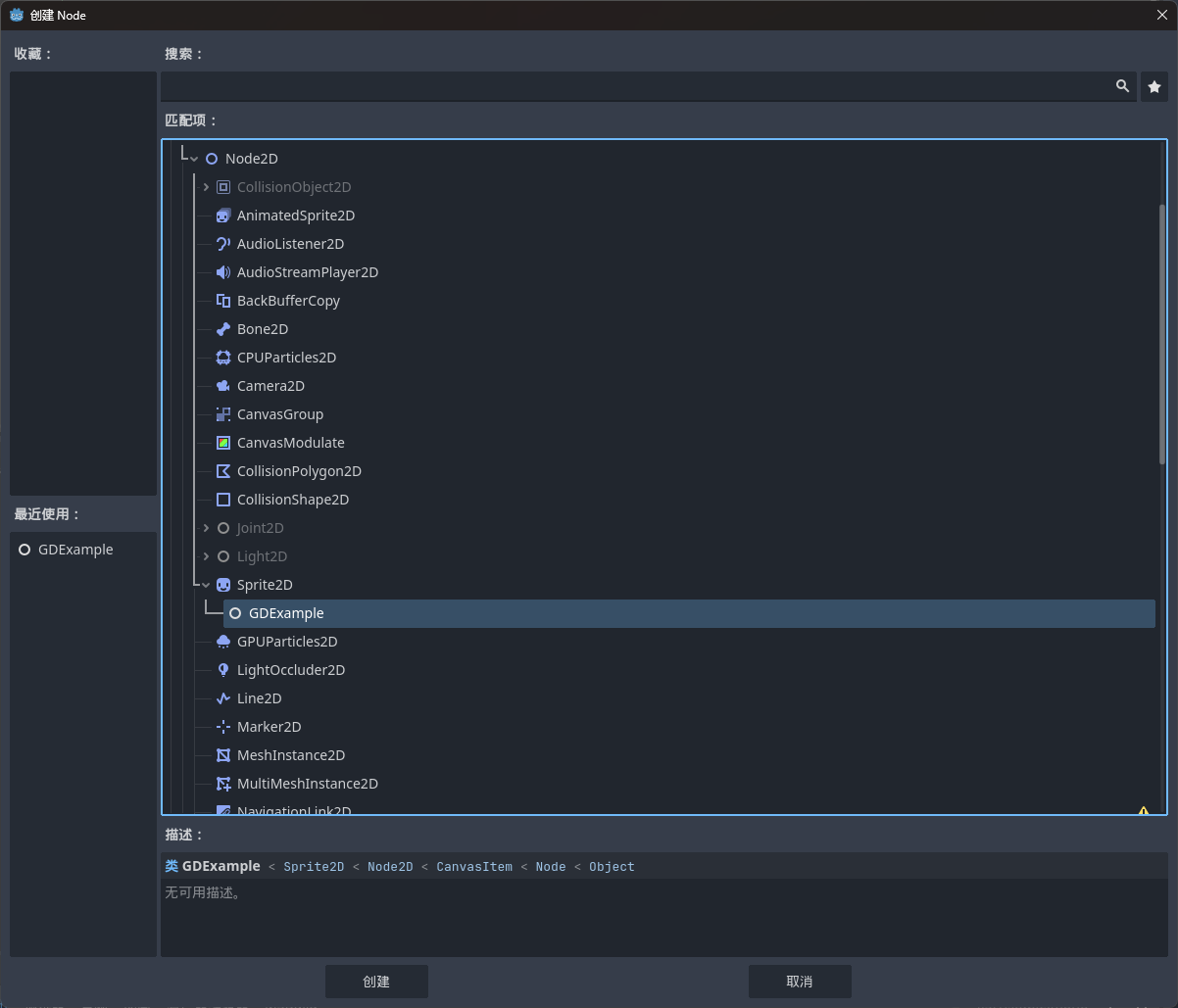
加载后,就可以在添加新节点中看到扩展定义的节点